Selling SaaS into the US can trigger sales tax even if you never set foot there.
The hard part is not the nexus.
The hard part is taxability.
One state treats SaaS as taxable software.
Another treats the same SaaS as a non-taxable service.
A third taxes it only if you require a download.
This guide makes it simple.
You will learn:
- Which US states tax SaaS (sales tax on SaaS access)
- How to confirm your exact SaaS model in any state using official state guidance
- What to document so you can defend your position in an audit (audit defense = proof file)
If you sell subscriptions, user seats, usage-based access, or cloud tools into the US, this applies to you.
SaaS Sales Tax In The US (What SaaS Sellers Need To Know First)
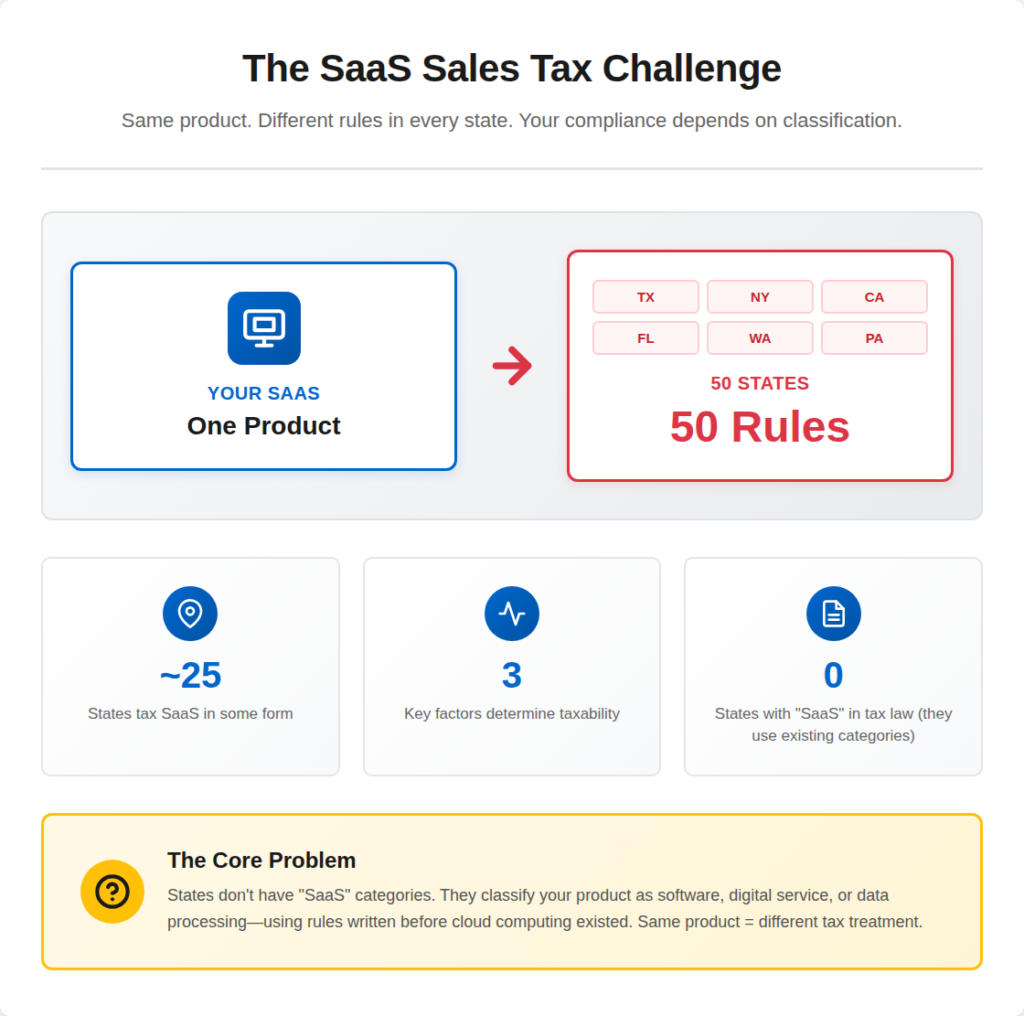
SaaS sales tax is not one US rule.
States set their own taxability rules for software access. Sales Tax Institute
A useful baseline: SaaS is taxable in 25 US states (Stripe’s summary as of March 2025). Stripe
Use that number to plan.
Do not use it to decide final taxability without checking the state’s own guidance.
What does “SaaS taxable” mean?
A state treats your SaaS as taxable when it taxes paid access to software.
Paid access = subscription access.
Taxable = you may need to charge sales tax on invoices to customers in that state.
Why states tax SaaS differently
States classify SaaS in different buckets, such as:
- Prewritten software (prewritten = not custom-built for one customer) Sales Tax Institute
- Digital services (digital automated service = automated online service) Washington Department of Revenue – Digital Products Guidance
- Taxable service categories like “data processing” in some states Texas Comptroller of Public Accounts
Delivery method can change the answer
Some states tax SaaS only if your customer must download software (download required = install needed to use core features).
Key point: Before you check any state, you must classify your SaaS delivery model (browser-only vs download-required vs bundled).
Before taxability, confirm whether you even have an obligation to collect—use a step-by-step nexus checklist.
Is SaaS Taxable Or Not? Start With Your SaaS Delivery Model
Do not start with state lists.
Start with what you actually sell.
States tax SaaS based on classification.
Classification depends on delivery and what the customer really buys.
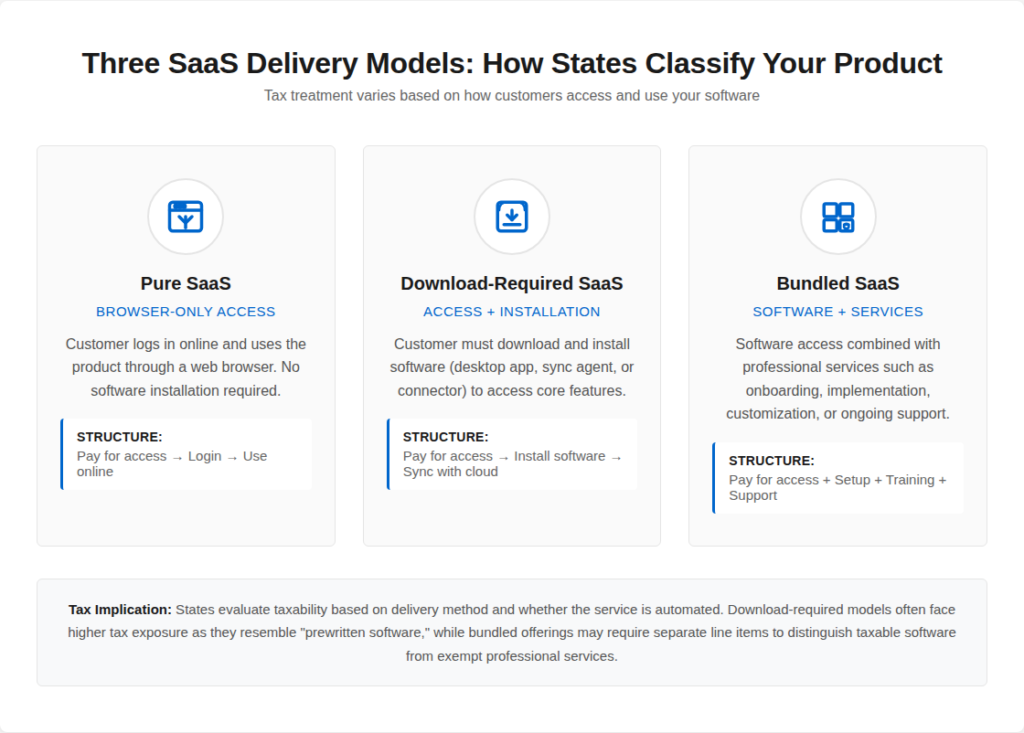
Pure SaaS (Browser-Only Cloud Access)
Pure SaaS means the customer logs in and uses the product online.
No installer. No local software required.
Simplified (pure SaaS) = “pay for access.”
Why this matters:
Many states decide SaaS taxability by asking if “remote access to software” counts as taxable software or a taxable digital service.
SaaS With A Downloaded App Or Desktop Agent (Download-Required SaaS)
Some SaaS needs a downloaded client to use core features.
Examples: desktop sync apps, local agents, connectors, POS apps.
Simplified (download-required) = “pay for access + install software.”
This model can flip taxability in some states because it looks closer to “prewritten software.”
Bundled SaaS (SaaS + Services + Setup)
Bundled SaaS mixes software access with human work.
Examples: onboarding, implementation, customization, managed services.
Simplified (bundle) = “software + people work.”
Some states look at the “true object” (true object = what the customer mainly buys). Sales Tax Institute notes states can treat SaaS differently depending on the agreement and how the state classifies the transaction. Sales Tax Institute
Quick Self-Check Before You Read The State Chart
Answer these in one minute:
- Do customers pay for software access?
- Do customers need a download to use core features?
- Does your invoice mix software + services on one line item?
If you can’t answer these, you will misclassify your product.
Then you will misread the state rule.
States That Tax SaaS In The US (Sales Tax On SaaS By State)
This is the section most SaaS sellers search for.
It is also where mistakes happen fastest.
As of 2024–2025, about 25 US states tax SaaS in some form, depending on how the software is delivered and classified.
This figure is referenced in Stripe’s SaaS taxability guidance and aligns with summaries published by the Sales Tax Institute and TaxJar.
Use this section to identify risk states, not to make final charging decisions.
SaaS Taxability By State (Common Markets)
| State | SaaS Taxable | How The State Treats SaaS | Notes |
| California | No (generally) | Service | Pure browser-based SaaS usually not taxable |
| Texas | Yes | Data processing service | SaaS treated as taxable data processing |
| Washington | Yes | Digital automated service | Explicit SaaS taxation |
| New York | Depends | Prewritten software | Download or software-like access increases risk |
| Illinois | Depends | Prewritten software | Delivery method matters |
| Florida | Limited | Taxable services | SaaS often exempt unless bundled |
| Pennsylvania | Depends | Digital products | Download vs cloud access matters |
| Massachusetts | Depends | Software services | SaaS with software elements often taxed |
| Kentucky | Depends | Digital property | Cloud access may be taxable |
| Ohio | Depends | Automated services | Fact-specific analysis required |
Why “Depends” Appears So Often With SaaS
States rarely label SaaS directly.
Instead, they evaluate:
- Whether the customer is paying for software use
- Whether a download or local execution is required
- Whether the service is automated or human-driven
That is why two SaaS products with similar pricing can be taxed differently across states.
Official state guidance consistently emphasizes classification over product labels.
Important Limitation Of Any SaaS State Chart
This table helps you prioritize exposure.
It does not replace a taxability review.
Before charging tax, you still need to confirm:
- Your SaaS delivery model
- Your contract and invoice wording
- The state’s official Department of Revenue position
Once you spot a “risk state,” confirm whether you even have a collection obligation there using this full workflow: How Foreign Founders Should Charge Sales Tax Correctly?
SaaS Sales Tax Rules That Override State Charts (Do Not Skip These)
State charts help you spot risk.
These rules decide what you actually charge.
1) Some States Tax SaaS As A Service, Not “Software”
A few states treat SaaS as a taxable service category.
If the state taxes services broadly, SaaS often becomes taxable too.
peSimplified (taxable service state) = “services are taxed, so SaaS gets pulled in.”
2) Download-Required SaaS Can Flip Taxability
Some states tax SaaS only if the customer must download software to use it.
Stripe calls this out directly: 25 states tax SaaS, and 7 more tax SaaS if downloads are required. Stripe
Simplified (download-required) = “install needed = higher tax risk.”
3) “Automated Digital Services” Rules Catch SaaS
Some states tax SaaS because they classify it as a digital automated service (digital automated service = automated online service).
Washington is a common example used in SaaS tax guides.
Simplified = “automated online service = taxable.”
4) Texas Has A Special Partial-Tax Rule (The 80/20 Issue)
Texas commonly treats SaaS under data processing services.
Texas also applies a 20% exemption, meaning 80% of the charge is taxable in many cases. Texas Comptroller
Simplified (Texas) = “80% taxed, 20% exempt.”
This matters for your invoices and pricing math.
Need the invoicing part done right? Use this guide to price, show tax, and invoice cleanly as a foreign seller: How Foreign Founders Should Charge US Sales Tax Correctly
5) Bundles Change The Answer Fast (SaaS + Services + Setup)
If you sell:
- SaaS + onboarding
- SaaS + implementation
- SaaS + managed services
Some states evaluate the “true object” of the transaction (true object = what the buyer mainly pays for).
If your invoice is one bundled line item, you increase audit risk and misclassification risk. TaxJar
Simplified = “one bundle line = harder to defend.”
6) B2B Vs B2C Can Change Taxability
Some states treat business use differently from personal use.
Taxability can depend on who buys and how they use it.
Simplified = “customer type can change tax.”
How To Check If Your SaaS Is Taxable In Any US State (Exact Workflow)
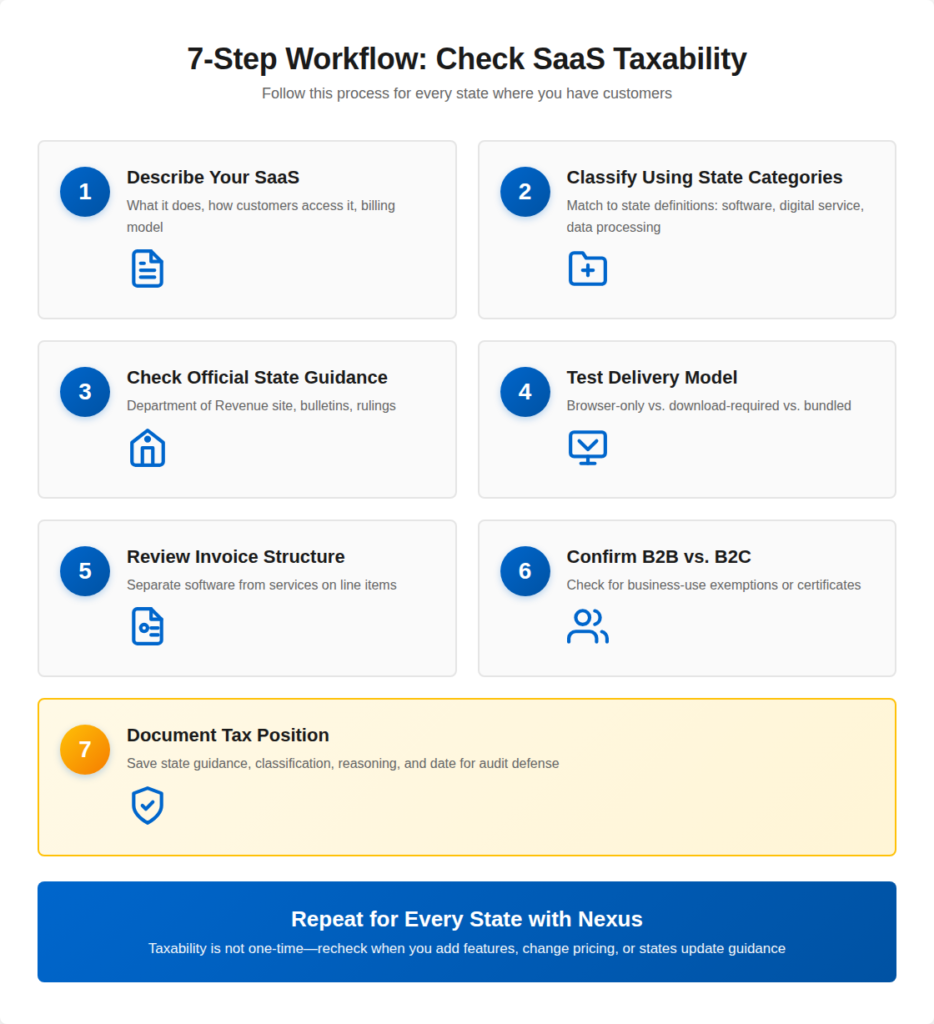
Use this workflow state by state.
Do not skip steps.
Do not rely on summaries alone.
Step 1: Write A One-Paragraph Description Of Your SaaS
States tax what you sell, not what you call it.
Write this once and reuse it:
- What the product does
- How customers access it (browser-only or download required)
- Whether humans deliver part of the value (support, setup, managed work)
- How you bill (subscription, usage, bundle)
Simplified:
“If I can’t explain my SaaS clearly, the state will explain it for me.”
Step 2: Classify Your SaaS Using State Categories
Every state maps SaaS into an existing tax bucket.
Common buckets:
- Prewritten software
- Digital automated service
- Data processing service
- Information service
- Non-taxable service
Your job is not to guess.
Your job is to match language used by the state.
Tip: Search the state site for terms like:
- “remote access software”
- “cloud-based software”
- “software as a service”
- “digital automated service”
Step 3: Check The Official State Guidance (Primary Source Only)
Blogs summarize.
States decide.
Look for:
- Department of Revenue FAQs
- Tax bulletins or notices
- Letter rulings (even if not binding, they show logic)
- Taxability matrices
Rule:
If it is not on a state website, treat it as commentary.
Step 4: Test The Delivery Model (The Hidden Switch)
Many SaaS decisions turn on delivery.
Ask:
- Does the customer need to install anything?
- Can the product run without a local download?
- Is offline use possible?
Some states tax SaaS only when a download exists.
Simplified:
“Browser-only = lower risk in many states.”
Step 5: Check Bundles And Invoicing Structure
States review invoices.
Risk increases when:
- SaaS + services are billed as one line
- Setup and access are inseparable
- Contracts describe “software + consulting” together
Best practice:
Split software access from services where allowed.
Step 6: Confirm B2B vs B2C Treatment
Some states tax SaaS differently based on who buys it.
Check:
- Is your buyer a business or individual?
- Is resale or business-use exemption available?
- Do you collect exemption certificates?
Simplified:
“Who buys it can matter as much as what it is.”
Step 7: Record Your Tax Position (Audit Defense File)
Create a simple record for each state.
Include:
- State name
- SaaS classification
- Link to official guidance
- Screenshot or PDF
- Your conclusion and date
This protects you later.
Simplified:
“If you can’t show your reasoning, the state will redo it.”
Don’t treat filings as optional. Here’s what non-compliance can trigger for LLC owners: How Ignoring Filing Can Kill Your LLC + Personal Liability Risks
SaaS Taxability Review Checklist (Quick Reference)
When To Recheck
Recheck taxability when:
- You add a desktop app or agent
- You bundle onboarding or managed services
- You change pricing structure
- The state updates guidance
SaaS taxability is not a one-time decision.
Real Examples Of SaaS Taxability (Based On Official State Guidance)
These examples show how states decide SaaS taxability in practice.
Use them as patterns, then apply the same logic to your product.
Example 1: Texas Taxes SaaS As Data Processing (And Taxes 80% Of The Charge)
Scenario
You sell a cloud app that stores, searches, and displays customer data.
You bill $1,000/month for access.
How Texas treats it:
Texas taxes data processing services.
Texas defines data processing as computerized entry, retrieval, search, compilation, manipulation, or storage of data. Texas Comptroller
Texas also gives a 20% exemption for data processing.
That means Texas taxes 80% of the charge in many cases. Texas Comptroller
Simplified (Texas)
Data processing SaaS = taxable.
Tax base often = 80% of the invoice.
Example 2: Washington Taxes Digital Automated Services (Subscription Access Counts)
Scenario
You sell a subscription SaaS tool that runs fully online.
No download required.
How Washington treats it:
Washington applies sales tax to digital products, including digital automated services (DAS), and it applies tax regardless of access method (downloaded, streamed, subscription, networking).
Washington’s rules also show subscription services can fall inside the digital automated service definition and become taxable.
Simplified (Washington)
Subscription SaaS access can be taxable as a digital automated service.
Example 3: New York Taxes Remote Access To Software (License To Remotely Access Software)
Scenario
You sell paid access to a software platform that customers use remotely.
You grant a license (license = paid permission to use).
How New York treats it
New York states that a license to remotely access software is subject to state and local sales tax. New York State Tax Department
Simplified (New York)
Remote access software license = taxable in New York.
Final Thoughts
SaaS sales tax in the US is not guesswork.
It is classification plus state rules.
If you sell SaaS into the US, do this in order:
- Classify your SaaS (browser-only, download-required, or bundled)
- Use official state guidance to confirm taxability
- Save proof of your decision (audit defense file = state link + screenshot + notes)
- Recheck when your product or pricing changes
Do not rely on “software is exempt” assumptions.
Do not rely on charts alone.
Use the workflow. It keeps you consistent across every state.
Not Sure Where Your SaaS Is Taxable?
Scounts.pk helps you register your company, manage taxes, and handle compliance in Pakistan and the USA.
Need help? Chat with us on WhatsApp or visit our Contact Us page.
Sources
https://stripe.com/guides/introduction-to-saas-taxability-in-the-us
https://thetaxvalet.com/blog/which-states-require-sales-tax-on-software-as-a-service
https://comptroller.texas.gov/taxes/publications/96-259.php
https://comptroller.texas.gov/taxes/publications/94-127.php
Disclaimer: This article is authored by a writer at Scounts Private Limited. Please note that the fees mentioned are subject to change and may not be accurate at the time of reading. The content has not yet reviewed by any of our LLC taxation experts. For expert advice or services, feel free to contact us.
